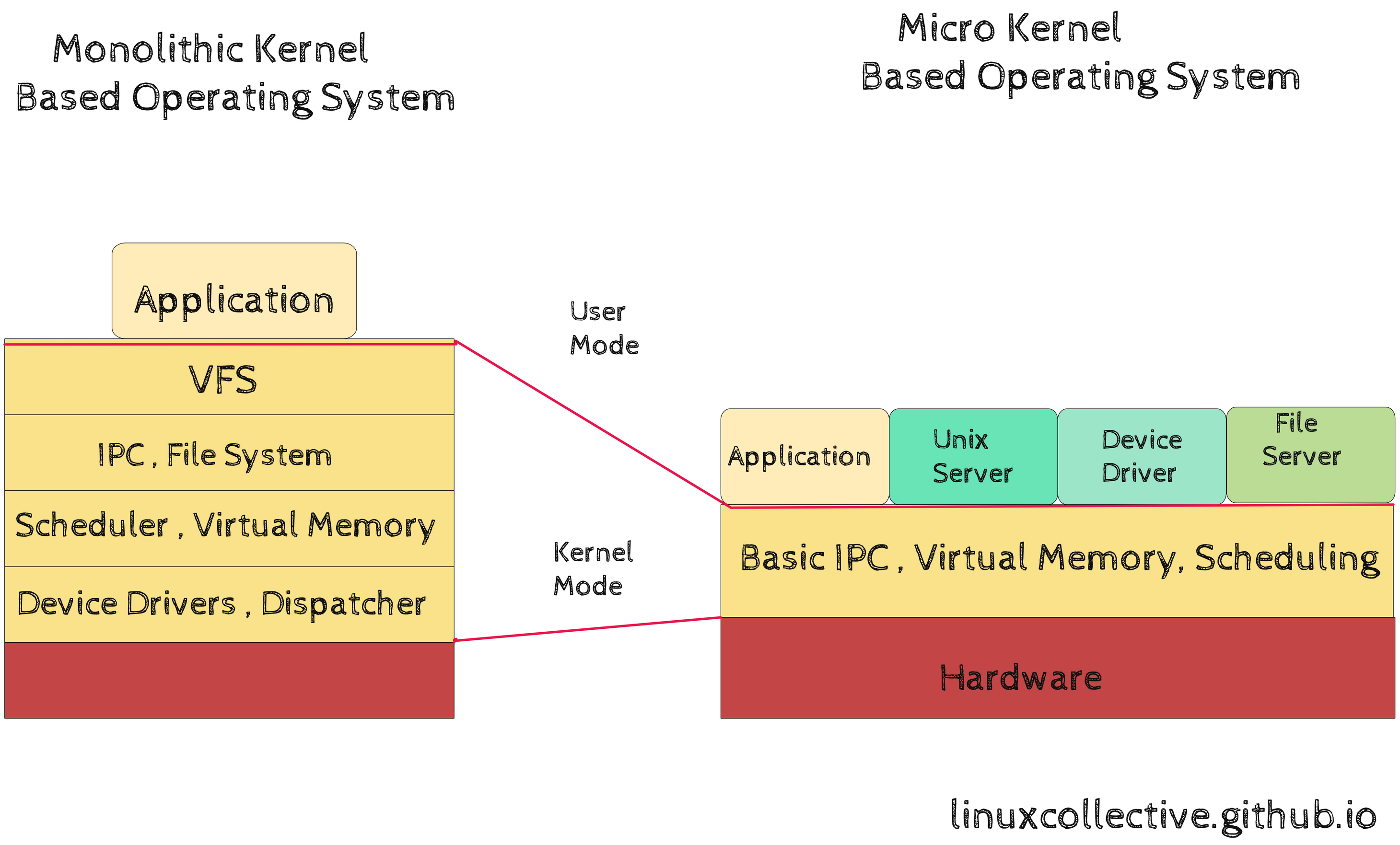
“Linux is a monolithic kernel. However, it is a modular monolithic kernel. Those who criticize monolithic architectures as inflexible usually confuse the logical structure of code with its physical address space execution model.”
— Linus Torvalds
The Linux Kernel is the foundational core of the operating system. It sits between physical silicon and user applications, acting as the ultimate arbiter of system resources: CPU time, virtual memory, storage controllers, network packet flows, and hardware interrupts.
To truly understand Linux, one must explore its architectural classification, its source tree layout, how Loadable Kernel Modules function, and how the machine boots from raw motherboard firmware into PID 1.
1. Architectural Paradigms: Monolithic vs. Microkernel
Operating system kernels are traditionally categorized by how they organize their system services across processor privilege levels:
    MONOLITHIC KERNEL (Linux)                MICROKERNEL (Mach, QNX, seL4)
+-------------------------------+         +-------------------------------+
|          USER SPACE           |         |          USER SPACE           |
| (Applications, Libraries)     |         | (Apps, VFS, Drivers, Network) |
+-------------------------------+         +-------------------------------+
               |                                     ^     |     ^
         System Calls                                | IPC | IPC |
               v                                     v     v     v
+-------------------------------+         +-------------------------------+
|         KERNEL SPACE          |         |         KERNEL SPACE          |
|  VFS | Drivers | Net | MM     |         |  IPC | Sched | Low-Level IRQ  |
|  All in single Ring 0 space   |         |  Minimal Ring 0 footprint     |
+-------------------------------+         +-------------------------------+
The Architectural Spectrum:
| Architectural Feature | Monolithic Kernel (Linux) | Pure Microkernel (seL4, Minix 3) | Hybrid Kernel (macOS XNU, Windows NT) |
|---|---|---|---|
| Execution Model | All core subsystems (VFS, IPC, Sched, Drivers) run in Ring 0. | Only IPC, task scheduling, and minimal trap handling run in Ring 0. | Core kernel in Ring 0; certain graphics/drivers pushed to Ring 3. |
| Subsystem Communication | Direct C function calls within a single address space. | Message passing (IPC) between isolated user-space servers. | Function calls in Ring 0; IPC for outer executive services. |
| Performance Overhead | Zero IPC latency; maximum CPU cache utilization. | High context-switching overhead from repeated Ring 3 ↔ Ring 0 jumps. | Moderate; balanced for desktop and driver stability. |
| Crash Containment | A fatal bug in any driver can cause a Kernel Panic (panic()). |
If a filesystem driver crashes, it restarts as a user process without halting the OS. | Subsystem bugs can crash the machine, though some drivers can recover. |
| Modularity Mechanism | Loadable Kernel Modules (LKM) loaded dynamically into Ring 0. | Native; servers are independent user-space executables. | Dynamic driver loading via kernel extensions (KEXTs / DriverKit). |
Why Linus Chose the Monolithic Model:
Microkernels prioritize architectural isolation at the cost of execution performance. Every packet received by a network card on a microkernel must transition through multiple context switches (Hardware → Microkernel → Driver Server → Protocol Server → Application).
Linux rejects this overhead. By executing all drivers and subsystems in a single address space, communication between the Virtual File System, page cache, and storage driver occurs via direct C pointer dereferences, extracting maximum throughput from hardware silicon.
2. Navigating the Linux Kernel Source Tree
The official Linux kernel source code (kernel.org) contains tens of millions of lines of code. However, it is cleanly structured into logical directories:
linux/
├── arch/          # Architecture-specific code (x86, arm64, riscv, s390, mips)
├── block/         # Block I/O layer, request queues, disk schedulers
├── certs/         # Cryptographic certificates for module signing
├── crypto/        # Cryptographic cipher implementations (AES, SHA, ChaCha20)
├── drivers/       # Hardware device drivers (Largest directory in kernel ~65%)
├── fs/            # Virtual File System (VFS) and filesystems (ext4, btrfs, xfs)
├── include/       # Global kernel C header files (.h)
├── init/          # Kernel initialization and start_kernel() entry point
├── ipc/           # Inter-Process Communication (semaphores, shared memory, pipes)
├── kernel/        # Core subsystems (scheduler, locking, cgroups, irq, time)
├── mm/            # Memory Management (paging, slab allocator, page cache, vma)
├── net/           # Networking protocols (TCP/IP stack, netfilter, eBPF TC/XDP)
├── rust/          # Rust language abstractions and bindings (Linux 6.1+)
├── security/      # Linux Security Modules (SELinux, AppArmor, Landlock)
└── tools/         # User-space developer utilities (perf, bpftool, objtool)
arch/: Contains the assembly instructions and low-level MMU mappings for each CPU family. For x86-64, look inarch/x86/.drivers/: Contains over half the total code in the repository. If you plug in a realtek NIC, an NVMe SSD, or an NVIDIA GPU, the driver lives here.kernel/: The intellectual core. Containssched/(process scheduling),locking/(mutexes, spinlocks, RCU), andcgroup/.
3. Loadable Kernel Modules (LKM)
Although Linux is monolithic, it does not require compiling a massive static binary every time new hardware is attached. Linux achieves dynamic modularity through Loadable Kernel Modules (LKMs).
LKMs are object files (with the .ko extension) that can be dynamically linked into the running kernel’s address space without rebooting the system.
Anatomy of a Minimal Kernel Module in C:
// hello_module.c
#include <linux/init.h>
#include <linux/module.h>
#include <linux/kernel.h>

MODULE_LICENSE("GPL");
MODULE_AUTHOR("Linux Collective");
MODULE_DESCRIPTION("A minimal demonstration Loadable Kernel Module");
MODULE_VERSION("1.0");

// Invoked when module is loaded via insmod/modprobe
static int __init hello_init(void) {
    pr_info("Linux Collective: Kernel Module loaded successfully into Ring 0!\n");
    return 0; // Return 0 means success
}

// Invoked when module is unloaded via rmmod
static void __exit hello_exit(void) {
    pr_info("Linux Collective: Kernel Module unloaded. Goodbye!\n");
}

module_init(hello_init);
module_exit(hello_exit);
Essential LKM User-Space Utilities:
lsmod: Reads/proc/modulesto display all currently loaded kernel modules.modinfo <name>: Inspects a module’s author, license, dependencies, and parameters.modprobe <name>: Intelligently loads a module along with all its prerequisite dependencies by consulting/lib/modules/$(uname -r)/modules.dep.rmmod <name>: Safely unlinks and unloads an unused module from kernel memory.
4. The Complete Linux Boot Sequence
From the moment electrical current reaches the motherboard to the moment an interactive login prompt appears, the system executes an eight-stage sequence:
[ 1. Power On & Firmware ]  --> UEFI / BIOS initializes motherboard, executes Secure Boot.
             |
[ 2. Bootloader Stage ]     --> GRUB2 / systemd-boot loaded from EFI System Partition (ESP).
             |                  Reads grub.cfg, loads vmlinuz and initramfs into RAM.
             v
[ 3. Kernel Decompression] --> CPU transitions to 64-bit Long Mode.
             |                  Decompresses vmlinuz image into raw executable kernel.
             v
[ 4. start_kernel() ]       --> Executes init/main.c.
             |                  Initializes memory paging, scheduler, interrupt gates (IDT).
             v
[ 5. Early Userspace ]      --> Kernel unpacks initramfs into a temporary rootfs (tmpfs).
             |                  Loads storage/NVMe/RAID drivers, unlocks encrypted disks.
             v
[ 6. Root Pivot ]           --> Mounts real root filesystem on disk; executes pivot_root.
             |
[ 7. Spawning PID 1 ]       --> Kernel executes /sbin/init or /lib/systemd/systemd.
             |
[ 8. Multi-User Target ]    --> systemd spawns daemons, network stack, and user login targets.
1. Firmware Stage (UEFI / BIOS)
The motherboard executes firmware stored on non-volatile flash memory. UEFI performs the Power-On Self-Test (POST), checks hardware components, and locates the designated boot device.
2. Bootloader Stage (GRUB / systemd-boot)
The bootloader reads its configuration file (grub.cfg), displays the operating system menu, and loads two critical files from disk into physical memory:
vmlinuz: The compressed Linux kernel binary (abzImageformat containing a decompression stub concatenated with rawvmlinux).initramfs: An initial root filesystem compressed as a cpio archive containing minimal kernel drivers and userspace startup scripts.- Kernel Command-Line Parameters: The bootloader passes configuration parameters (inspectable live via
cat /proc/cmdline), such asroot=UUID=...,ro,quiet, andsystemd.unified_cgroup_hierarchy=1.
3. Early Kernel & start_kernel()
The decompression routine runs, switches the CPU into 64-bit Long Mode, and jumps to start_kernel() in init/main.c. Here, the kernel:
- Configures the Memory Management Unit (MMU) and Page Tables.
- Initializes the trap gates and Interrupt Descriptor Table (IDT).
- Initializes the scheduling runqueues and timers.
- Spawns
kthreadd(PID 2) to manage background kernel worker threads.
4. initramfs, Drivers & switch_root
In How Linux Works, Brian Ward calls the initial RAM filesystem the critical solution to Linux’s “chicken-and-egg” storage paradox: To mount a root filesystem on an encrypted disk (LUKS), LVM volume, or network SAN (iSCSI), the kernel needs drivers and user-space binaries—but those drivers reside on the very storage disk the kernel cannot yet read!
The kernel resolves this by:
- Unpacking the
initramfsimage into an in-memorytmpfsroot. - Executing
/init(an early shell script or minimal systemd instance). - Loading necessary storage kernel modules (
nvme.ko,dm-mod.ko,ext4.ko) and unlocking encrypted volumes. - Mounting the real persistent root filesystem at
/sysroot. - Executing
switch_root /sysroot /sbin/init: This cleanly deletes everything in the temporary ramdisk to free RAM and pivots root to the real drive before starting PID 1.
5. Executing PID 1
Finally, the kernel transitions from Ring 0 to Ring 3 by invoking execve() on the init daemon:
run_init_process("/sbin/init");
Once PID 1 starts, the kernel never executes user code directly again; it strictly responds to interrupts, exceptions, and system calls.
5. Kernel Preemption Models
When configuring a custom kernel via make menuconfig (General setup → Preemption Model), Linux allows developers to choose how aggressively the kernel can interrupt itself:
CONFIG_PREEMPT_NONE(Server): The kernel will not interrupt a task running in kernel mode. Maximizes raw computational throughput; standard for high-performance computing clusters and database servers.CONFIG_PREEMPT_VOLUNTARY(Desktop Default): Introduces explicit preemption points (cond_resched()) during long kernel operations to improve desktop UI responsiveness.CONFIG_PREEMPT(Low-Latency Desktop / Gaming): Any task in kernel mode can be preempted at any time unless holding a spinlock. Ideal for real-time audio production and latency-sensitive gaming.CONFIG_PREEMPT_RT(Hard Real-Time): Converts kernel spinlocks into sleeping mutexes, guaranteeing bounded interrupt latencies for robotics, medical devices, and industrial avionics.
6. Hands-On Practical Labs
Lab 4.1: Writing and Loading a Custom Kernel Module with Parameters
In this lab, we build a Loadable Kernel Module (hello_lkm.c) that registers module parameters, prints timestamps to the kernel ring buffer (dmesg), and unloads cleanly.
Source Code: hello_lkm.c
#include <linux/init.h>
#include <linux/module.h>
#include <linux/kernel.h>
#include <linux/moduleparam.h>

MODULE_LICENSE("GPL");
MODULE_AUTHOR("Linux Collective");
MODULE_DESCRIPTION("Configurable Kernel Parameter Demonstration");
MODULE_VERSION("1.0");

static char *target_name = "Kernel Architect";
static int repeat_count = 3;

/* Register module parameters visible via /sys/module/hello_lkm/parameters/ */
module_param(target_name, charp, 0644);
MODULE_PARM_DESC(target_name, "Recipient name displayed in dmesg log");

module_param(repeat_count, int, 0644);
MODULE_PARM_DESC(repeat_count, "Number of greeting messages emitted");

static int __init hello_lkm_init(void) {
    int i;
    pr_info("hello_lkm: Module loaded into Ring 0!\n");
    for (i = 0; i < repeat_count; i++) {
        pr_info("hello_lkm: [%d/%d] Greetings, %s!\n", i + 1, repeat_count, target_name);
    }
    return 0;
}

static void __exit hello_lkm_exit(void) {
    pr_info("hello_lkm: Cleaning up and unloading from Ring 0. Farewell!\n");
}

module_init(hello_lkm_init);
module_exit(hello_lkm_exit);
Module Makefile
obj-m += hello_lkm.o

KDIR ?= /lib/modules/$(shell uname -r)/build

all:
	make -C $(KDIR) M=$(PWD) modules

clean:
	make -C $(KDIR) M=$(PWD) clean
Compilation & Testing:
# 1. Compile module
make

# 2. Insert module with custom parameters
sudo insmod hello_lkm.ko target_name="Linus" repeat_count=2

# 3. Verify kernel ring buffer messages
sudo dmesg | tail -n 5

# 4. Inspect sysfs parameter file
cat /sys/module/hello_lkm/parameters/target_name

# 5. Remove module
sudo rmmod hello_lkm
sudo dmesg | tail -n 2
Lab 4.2: Compiling Vanilla Linux Kernel & Booting in QEMU
In this lab, we build a minimal Linux kernel from source and boot it in a lightweight QEMU virtual machine without touching host bootloaders.
Step 1: Install Build Dependencies
sudo apt-get install -y build-essential libncurses-dev bison flex libssl-dev libelf-dev qemu-system-x86
Step 2: Download & Extract Kernel Source
cd /tmp
wget https://cdn.kernel.org/pub/linux/kernel/v6.x/linux-6.6.30.tar.xz
tar -xf linux-6.6.30.tar.xz
cd linux-6.6.30
Step 3: Configure Minimal Kernel
# Generate default minimal x86_64 config
make defconfig

# (Optional) Open interactive menu to configure drivers or preemption models:
# make menuconfig

# Compile compressed kernel image using all CPU threads
make -j$(nproc) bzImage
Step 4: Boot Kernel Directly in QEMU
qemu-system-x86_64 \
    -kernel arch/x86/boot/bzImage \
    -nographic \
    -append "console=ttyS0 panic=1"
Watch the Linux kernel boot in real-time, initialize ACPI tables, set up the memory allocators, and attempt to launch PID 1!
Lab 4.3: Unpacking and Auditing an initramfs CPIO Archive
In this lab, we unpack and audit the real initramfs image used by your distribution bootloader to inspect the early userspace /init environment and pre-loaded drivers.
# 1. Create a workspace directory
mkdir -p /tmp/initramfs_inspect && cd /tmp/initramfs_inspect

# 2. Locate active distribution initrd image
INITRD=$(ls /boot/initrd.img-$(uname -r) 2>/dev/null || ls /boot/initramfs-$(uname -r).img 2>/dev/null)
echo "Inspecting initramfs: $INITRD"

# 3. Unpack using unmkinitramfs (Debian/Ubuntu) or zcat/cpio (RHEL/Fedora/Arch)
if command -v unmkinitramfs >/dev/null 2>&1; then
    unmkinitramfs "$INITRD" .
elif command -v lsinitramfs >/dev/null 2>&1; then
    lsinitramfs "$INITRD" | head -n 30
else
    # Raw cpio extraction for uncompressed or gzip cpio archives
    zcat "$INITRD" 2>/dev/null | cpio -idmv 2>/dev/null || cpio -idmv < "$INITRD" 2>/dev/null
fi

# 4. Inspect the early /init shell script or systemd binary
ls -la init main/init 2>/dev/null

# 5. Inspect storage and filesystem kernel modules packaged inside initramfs
find . -name "*.ko*" | grep -E 'ext4|nvme|dm-mod' | head -n 10

# 6. Clean up
cd / && rm -rf /tmp/initramfs_inspect
7. Summary Checklist
- Monolithic vs Microkernel: Understood single address space efficiency and Loadable Kernel Modules.
- Source Tree Anatomy: Navigated
arch/,mm/,fs/, andkernel/. - Boot Pipeline: Traced from firmware POST to
start_kernel(),initramfs,switch_root, and PID 1 execution. - Kernel Command Line: Inspected
/proc/cmdlineparameters passed by the bootloader. - Preemption Models: Contrasted
CONFIG_PREEMPT_NONEwithCONFIG_PREEMPT_RT. - Compiled Custom LKM: Built a module with sysfs parameters and verified in
dmesg. - QEMU Kernel Boot: Compiled a vanilla x86-64 kernel and booted
bzImage. - initramfs Auditing: Unpacked and inspected the cpio early userspace image.